 CacheGuard-OS
User's Guide - Version UF-2.6.3
Web Authentication
Web authentication can be used together with the web and rweb modes to restrict web browsing and/or access to reverse websites to authenticated users only. By enabling web authentication mode, explicit users of the web proxy in forwarding/browsing mode (web mode) and/or external users of reverse websites in reverse mode (rweb mode) are required to authenticate before being allowed to connect to the CacheGuard appliance. The CacheGuard appliance supports LDAP and Kerberos authentication modes, which you can configure using the authenticate command.LDAP Authentication
In LDAP authentication mode, the first time a web user tries to access a web page, they are prompted to submit their credentials via a pop-up window opened by the web browser. With this authentication method, called basic authentication, the CacheGuard appliance sends the collected credentials to an LDAP server. If the credentials are validated by the LDAP server, the CacheGuard appliance allows the web user to connect. Otherwise, access is rejected. You can activate web authentication by using the mode authenticate on command.To configure LDAP authentication, you must specify at least one LDAP server and the LDAP request to be sent to it to authenticate users. In addition, because most LDAP servers require clients to bind before accepting requests, you must configure LDAP binding in your authentication settings. For example, the commands below configure LDAP authentication to send the 'ou=people,dc=example,dc=com' 'uid' 'userPassword' 'objectClass=inetOrgPerson' request to the LDAP server with hostname ldap.example.com. Since this LDAP server requires binding, LDAP binding is enabled by specifying the 'cn=admin,dc=example,dc=com' bind DN (Distinguished Name).
- mode authenticate on
- authenticate web on
- authenticate mode ldap on
- authenticate ldap request 'ou=people,dc=example,dc=com' 'uid' 'userPassword' 'objectClass=inetOrgPerson'
- authenticate ldap server add ldap ldap.example.com
- authenticate ldap binddn 'cn=admin,dc=example,dc=com' on
- apply
Note that if an empty value ('') is specified as the password LDAP attribute, an LDAP binding is performed during the basic authentication phase instead of comparing the entered password with the value stored in the password LDAP attribute (this is the preferred method used by Microsoft AD™). If your LDAP server is Microsoft AD™, you can use the following commands to configure LDAP authentication:
- mode authenticate on
- authenticate mode ldap on
- authenticate ldap request 'cn=users,dc=example,dc=com' 'sAMAccountName'
- authenticate ldap server add ldap ldap.example.com
- authenticate ldap binddn 'cn=webgateway,cn=users,dc=example,dc=com' on
- apply
Kerberos Authentication
In Kerberos authentication mode, the credentials used by users to log in to their workstations are retrieved by the CacheGuard appliance during a negotiation phase and then used to authenticate web users. Kerberos-based authentication is a complex process that goes beyond this documentation, so we focus on how to configure the CacheGuard appliance to use Microsoft AD (as a Kerberos server).
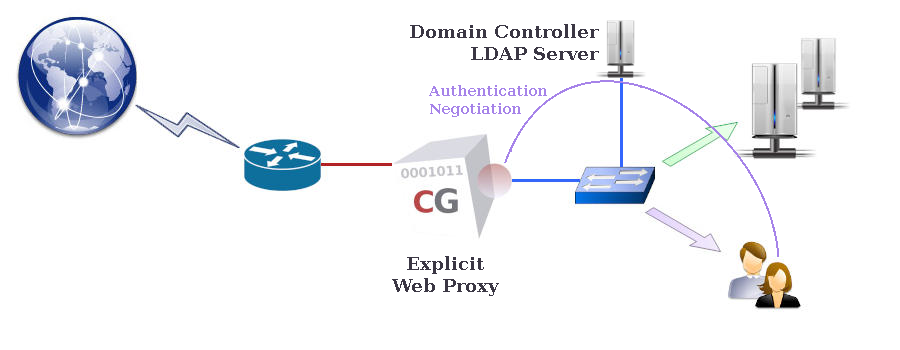
- domainname example.com
- mode authenticate on
- authenticate mode kerberos on
- authenticate kerberos server add dc.example.com
- authenticate kerberos web proxy
- authenticate ad on
- authenticate ad rdn 'cn=computers'
- apply
It is IMPORTANT to note that the first time Kerberos authentication mode is activated, after the apply operation completes, it must be initialised on the CacheGuard appliance. During the initialisation process, if the LDAP object representing the web proxy in Microsoft AD does not yet exist, a new LDAP object for the web proxy and its associated account is created in Microsoft AD. By default, the account name is the same as the Kerberos service name (in the example above, proxy). The initialisation process also allows the CacheGuard appliance to obtain a Kerberos ticket. To initialise Kerberos authentication, use the following command:
- authenticate kerberos create administrator
- authenticate kerberos report