 CacheGuard-OS
User's Guide - Version UF-2.6.1
Transparent Mode
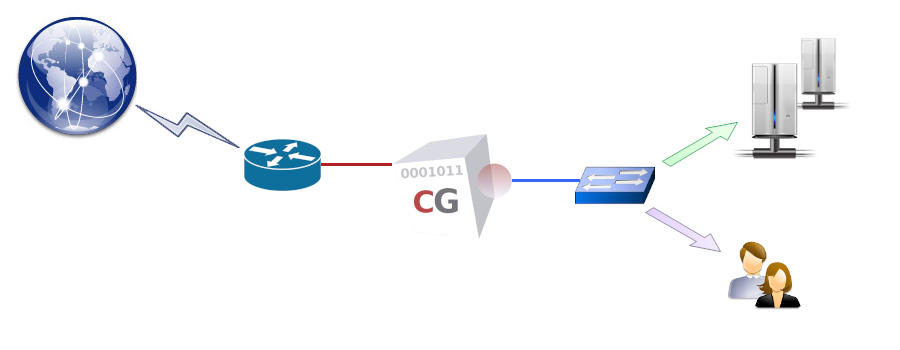
CacheGuard appliance integrates a web proxy that can be explicitly used by web clients (users or machines). In an explicit implementation, web users must configure their browsers to use the CacheGuard appliance as an HTTP/HTTPS proxy by specifying its internal IP address (web address in VLAN mode) and proxy port (8080 by default). If modifying browser configurations is not an option in your network, you can implement CacheGuard in transparent mode. In transparent mode, HTTP traffic (and optionally HTTPS traffic) is transparently intercepted by the appliance and can then be processed by the various integrated services that the CacheGuard appliance offers (such as URL filtering, antivirus protection, web caching, and more).To function as a transparent web gateway (web proxy), the CacheGuard appliance must be positioned along the web traffic path - meaning that all web traffic must pass through it. The simplest method to achieve this is to use the CacheGuard appliance as the default gateway for your LAN. If using CacheGuard as the default gateway for all internet traffic is not desirable, a Layer 4 (L4) switch may be employed to implement policy-based routing, ensuring that only web traffic is routed through the CacheGuard appliance. To activate the transparent mode, use the mode tweb on (or mode transparent on) command.
Using a Layer 4 Switch
A Layer 4 (L4) switch allows routing of IP traffic based not only on IP addresses but also on TCP/UDP headers. To ensure that only web traffic is routed through the CacheGuard appliance while other traffic is directed through a different gateway, your policy-based routes on the L4 switch should route all traffic destined for TCP port 80 (HTTP) and, optionally, TCP port 443 (HTTPS) via the CacheGuard appliance, while all other traffic continues via your standard internet gateway.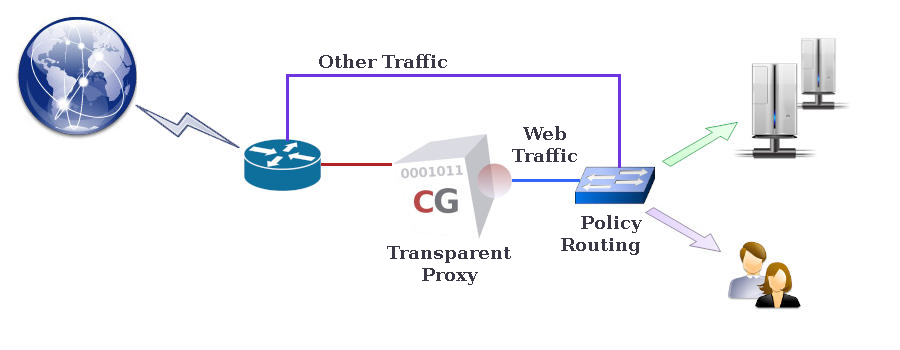
- iptables -t mangle -A PREROUTING -p tcp --dport 80 -j MARK --set-mark 5
- echo "100 transparent-proxy" >> /etc/iproute2/rt_tables
- ip route add default via <cacheguard-internal-ip> table transparent-proxy
- ip rule add fwmark 5 table transparent-proxy
Selective Transparency
Once transparent mode is activated on a CacheGuard appliance, all web traffic routed through it is intercepted, regardless of source or destination IP addresses. This behaviour may be restrictive for users who require more control over their web traffic (for example, administrators). To address this, web traffic interception can be limited to specific networks using the transparent (or tweb) command. For instance, to limit transparent mode to web clients within the 172.18.2.0 255.255.255.0 or 10.26.0.0 255.255.0.0 networks that are routed via the internal network interface, use the following commands:- mode transparent on
- transparent raz
- transparent add internal 172.18.2.0 255.255.255.0
- transparent add internal 10.26.0.0 255.255.0.0
- apply